IDES timeline Air Force

ASight2C

Well-Known Member
PEB Forum Veteran
Registered Member
I’m getting pretty impatient with the IDES. I’ve been in limbo for months now. I’m looking for any type of advice to get an update or a guess of when I will hear back. (Peblo/VSR) no help at all.

MEB TIMELINE IDES
(AD-AF)

AMRO Board-Feb 22
DAWG- June 22
MEB notification-Jul 22
ALC-Code 37 assigned- Oct 22
Commanders impact statement-Oct 22
C&P exams initiated-Jan 23
C&P exams completed-May 23
VA Office received docs-15 May 23
Contact VA Office (no update)- 30 May 23
 
I’m getting pretty impatient with the IDES. I’ve been in limbo for months now. I’m looking for any type of advice to get an update or a guess of when I will hear back. (Peblo/VSR) no help at all.

MEB TIMELINE IDES
(AD-AF)

AMRO Board-Feb 22
DAWG- June 22
MEB notification-Jul 22
ALC-Code 37 assigned- Oct 22
Commanders impact statement-Oct 22
C&P exams initiated-Jan 23
C&P exams completed-May 23
VA Office received docs-15 May 23
Contact VA Office (no update)- 30 May 23
**Update**
Contact VA Office (no update)-6 June 23
 
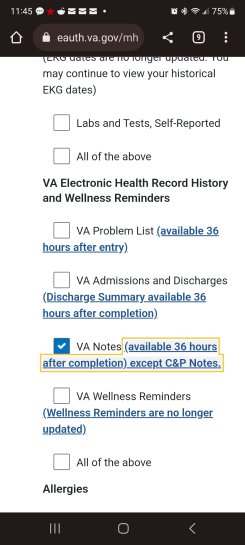
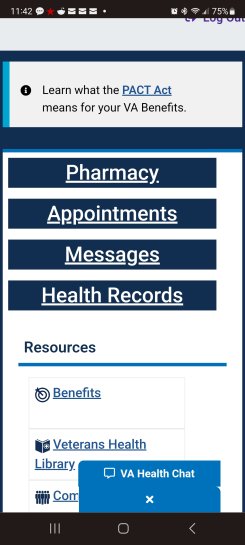
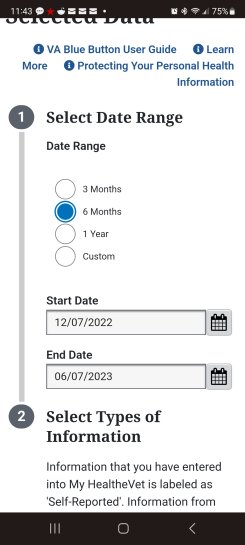
If you are signed up for MyHealthevet you have access to all your VA Medical documents. Start by logging in, click Health Records, click VA Blue Button Report, select the date ranges of your C&P Exams, scroll down and click each box of information you want populated in the report. Be sure to click VA Notes, C&P Notes are usually available within 30 days after the information has been input. Scroll to the bottom of the page and click submit. A report will be generated you can either download as pdf or view as a text file. I hope this helps. You can atleast see if they service connected you and if that statement is in there " at least as likely as not" .
 

Attachments

  • Screenshot_20230607_114228_Chrome.jpg
    Screenshot_20230607_114228_Chrome.jpg
    369.6 KB · Views: 9
  • Screenshot_20230607_114323_Chrome.jpg
    Screenshot_20230607_114323_Chrome.jpg
    382.5 KB · Views: 9
  • Screenshot_20230607_114537_Chrome.jpg
    Screenshot_20230607_114537_Chrome.jpg
    477.4 KB · Views: 9
If you are signed up for MyHealthevet you have access to all your VA Medical documents. Start by logging in, click Health Records, click VA Blue Button Report, select the date ranges of your C&P Exams, scroll down and click each box of information you want populated in the report. Be sure to click VA Notes, C&P Notes are usually available within 30 days after the information has been input. Scroll to the bottom of the page and click submit. A report will be generated you can either download as pdf or view as a text file. I hope this helps. You can atleast see if they service connected you and if that statement is in there " at least as likely as not" .
Thank you @beckynbach
 
Top